


Use APKPure App
Get Killapps - Close Running Apps old version APK for Android

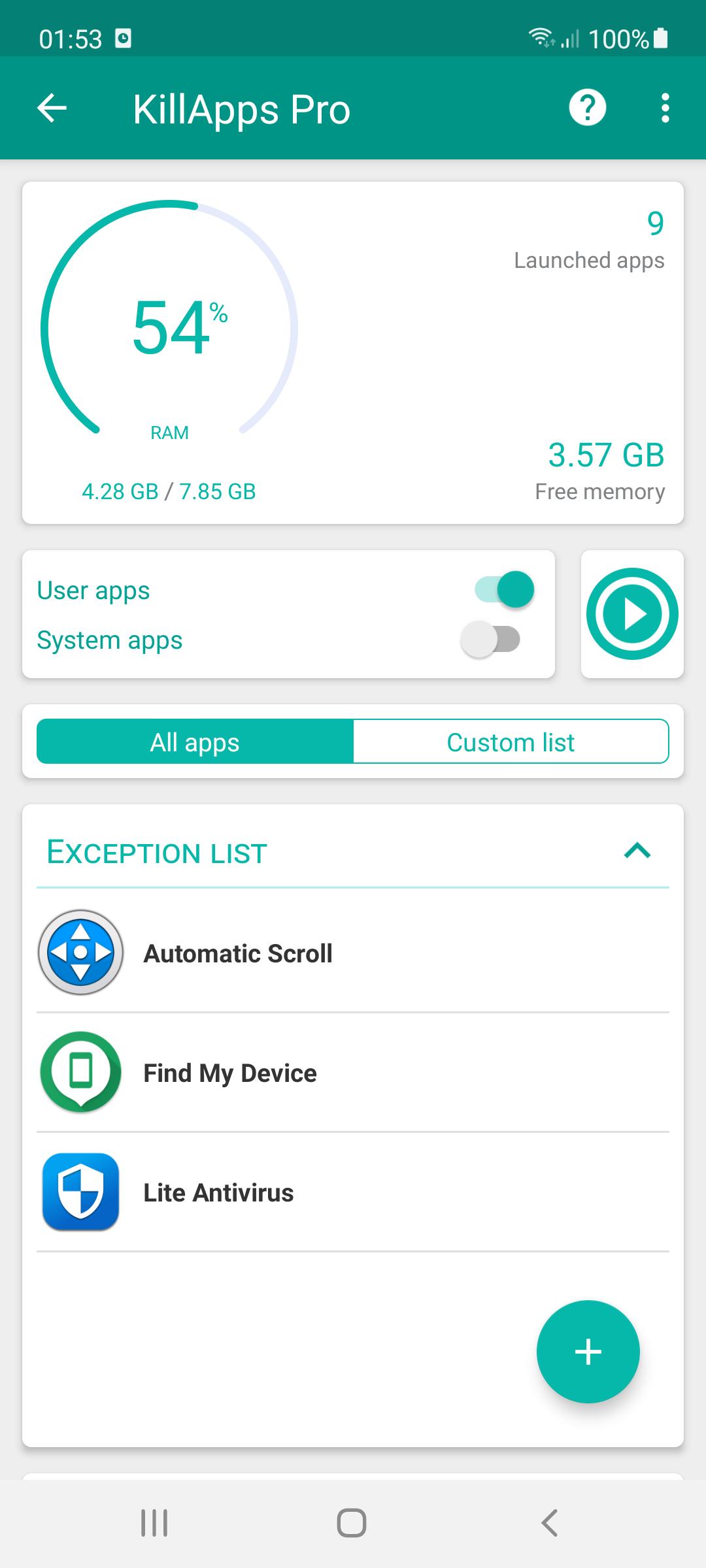


Killapps - Close Running Apps is a utility app that closes background apps to free memory and save battery.
Killapps - Close Running Apps helps you end running tasks quickly so your phone feels responsive again. It offers a simple one tap action as well as precise control when you want to stop specific apps. It uses Accessibility Service to automate the process and it does not collect any personal data, which keeps your activity private. You can get the Killapps - Close Running Apps APK on APKPure for a secure and fast download. Moreover, the app stays lightweight so it runs smoothly on most devices without adding extra load.
Close all background apps in one tap
Killapps - Close Running Apps can terminate open background tasks with a single action. This frees up RAM and CPU time so the device can focus on the apps you are actively using. It is useful after gaming sessions or long days of multitasking.
Selective control over what to close
You can choose individual apps to close instead of ending everything. This gives you fine control when you only need to stop a few items that misbehave. Therefore, you keep important tools active while removing what you no longer need.
Performance boost for smoother use
By releasing memory and reducing background load, Killapps - Close Running Apps helps reduce lag during scrolling, switching, and launching apps. In addition, fewer active processes can shorten app load times and help avoid freezes on older devices.
Battery saver through reduced background activity
When unneeded apps stop running, they stop waking the device and using power. As a result, Killapps - Close Running Apps helps extend battery life during the day. This is helpful on trips or busy days when charging is not available.
Supports user apps and certain system apps
Killapps - Close Running Apps can act on user installed apps and, when allowed by the device, on some system components. It also includes RAM monitoring so you can see the impact of closing tasks. Furthermore, it remains light on resources while it works.
Accessibility automation and helpful for physical disabilities
The app uses the Android Accessibility Service to automate closing steps one by one. This avoids manual taps through system screens and can assist users with physical disabilities who find repeated actions difficult. It also keeps the workflow consistent across different apps.
Killapps - Close Running Apps requests the Accessibility Service permission to automate the sequence of opening system pages and confirming closures. This is required so the app can perform actions that otherwise need many manual taps. It also improves consistency across different device brands.
No data is collected by Killapps - Close Running Apps. Actions happen locally on your device, and the app does not send personal information to external servers. In addition, permission prompts are tied to clear functions so you know why each is needed.
Accessibility Service supports the automation described above. A usage access permission may also be requested to display running apps and usage information so you can choose what to close. Some system processes cannot be closed due to device rules, and behavior can vary by manufacturer and Android version.
This quick guide explains how to start, grant the required access, and close tasks safely. Follow the steps to use the one tap action or choose specific apps.
Killapps - Close Running Apps focuses on fast cleanup, practical control, and privacy friendly operation. Download Killapps - Close Running Apps and keep your phone responsive throughout the day.
For official information from the developer, visit the website below.
How do I close open running apps?
Open Killapps - Close Running Apps, grant Accessibility Service, then tap Close All to end background tasks automatically. The tool navigates through system screens and closes apps one by one. You can also review the list and choose specific items if you prefer.
How do I close an app that is still running?
In Killapps - Close Running Apps, locate the app in the running list and select it to close. The Accessibility Service performs the required taps for you, which removes the need to open system settings manually. This helps when a single app keeps working in the background.
Will Killapps - Close Running Apps speed up my phone?
Yes, closing background tasks can free RAM and CPU, which helps reduce lag and improves responsiveness. Killapps - Close Running Apps focuses on this process and keeps its own resource use low. Results vary by device, app load, and how many tasks are running.
How do I stop some apps from running without closing everything?
Use the selective control in Killapps - Close Running Apps to pick individual apps to close. This lets you keep important tools active while ending specific tasks that consume resources. It is useful when only a few apps are causing slowdowns.
Where can I get the Killapps - Close Running Apps APK latest version?
Get the Killapps - Close Running Apps APK latest version on APKPure for a safe and direct download. You can also update to newer builds from the same page when they become available. Search for the app name on APKPure and tap download Killapps - Close Running Apps to begin.
Last updated on Jan 14, 2026
v1.56.9:
Fixed bugs.
Latest Version
 1.56.9
Uploaded by
Kitti Kongasa
Requires Android
Android 7.0+
Available on

Category
Report

Discover what you want easier, faster and safer.
