


Use APKPure App
Get Gallery Camera old version APK for Android

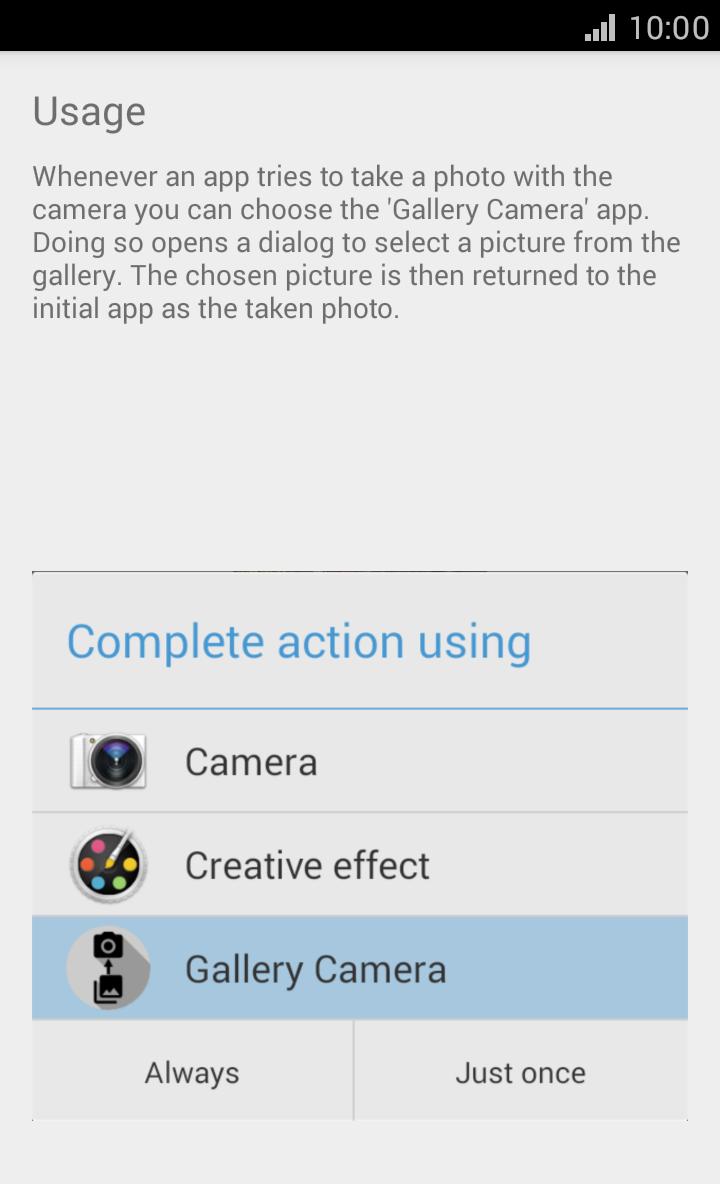

Gallery Camera is a photo utility app that lets you pick existing images through camera requests.
Gallery Camera helps when an app only offers a camera button and no gallery option. It acts like a camera choice so you can continue the flow without changing apps, which keeps the process quick and familiar. After installation, it appears in the system camera chooser in supported situations, and it hands the selected picture back to the requesting app as expected. If you prefer a small tool that fits into Android’s standard flow, the Gallery Camera APK provides that behavior without extra steps.
Works as a camera choice in other apps
Gallery Camera appears alongside your usual camera options when an app asks you to take a photo. You tap it just like a normal camera, and the flow continues inside the current app. This approach keeps your attention on the task rather than switching between tools.
Select existing photos from gallery or files
Instead of opening a lens, Gallery Camera opens your gallery or another storage provider you use on your phone. You can browse albums or folders and pick a photo that already exists. This makes it easy to reuse a recent shot or a saved image from your files.
Returns the image as if freshly captured
Many apps expect a new picture from the camera flow. Gallery Camera matches that expectation by returning your chosen image as if it was just taken. As a result, the calling app accepts the photo without any special handling.
Useful in chat and social apps that only show camera
Some messengers and platforms present only a camera button during upload. Gallery Camera lets you share an older photo in those cases without leaving the app. This reduces back and forth and keeps conversations moving.
Lightweight design with broad intent compatibility
Gallery Camera is small and focuses on a simple selection flow. It relies on Android’s standard camera intent, so it works with most apps that use the built in chooser. This keeps behavior predictable across a wide range of everyday apps.
Gallery Camera is also known as GalleryCam, and both names refer to the same gallery camera app by developer Felix Kloft. The app is designed for Android devices only. It is not available for iPhone, and there is no separate iOS version. If you see either name in articles or search results, it points to this same Android utility.
Gallery Camera uses Android’s standard camera intent and chooser. You will see it as an option when an app requests a camera capture through that system dialog. If an app uses a fully custom camera screen that does not trigger the system chooser, Gallery Camera may not appear. Some users call it a fake camera app or fake gallery camera because it sends an existing photo through a camera style flow, which is the intended behavior.
After you download Gallery Camera, it becomes available in supported “Take photo” dialogs inside your apps. The process follows the same flow you already know from the system camera chooser. You only switch the source to an existing picture rather than opening the lens.
Gallery Camera adds a practical option to the Android camera chooser so you can share existing photos in camera only flows. For the most reliable behavior, update to the Gallery Camera latest version when available.
Last updated on Oct 19, 2015
Minor bug fixes and improvements. Install or update to the newest version to check it out!
Latest Version
 1.0
1.0
Uploaded by
Carlos Eduardo Ferreira Mendes
Requires Android
Android 2.2+
Category
Report

Discover what you want easier, faster and safer.
